LandOffer
Job search
Novoresume Review: One-Page Free Resumes and Non-Renewing Premium Access
Review Novoresume’s one-page Basic limits, conflicting free-access terms and non-renewing Premium periods, with file checks and a worked editing budget.
Novoresume is worth considering for a restrained PDF resume or a defined period of paid editing without automatic renewal. Its Basic offer lists one version and one page, but ongoing free downloading is unresolved: the pricing page says “Free Unlimited,” while current membership help describes a limited Basic access period. Treat that difference as part of the buying decision. Confirm both the selected design features and the account’s current download access before relying on a free attachment.
LandOffer publishes this review and offers job-search tools. We checked public sources on October 14, 2026, including the pricing and membership pages in a signed-out browser. We did not create an account, test a vendor download or buy access. Our fictional cases include an original local PDF and checked planning arithmetic. Choose a relevant opening from recent LandOffer roles, then establish the required file and next editing task before choosing a plan.
Decide whether the Basic document fits your task
The pricing page describes Basic as a single resume version, limited to one page, using predefined layouts. It excludes a cover letter. This is a plausible starting point for an applicant whose relevant material fits one maintained PDF and who does not need custom section placement.
One version and one page are different restrictions. A concise resume can still require two independently maintained target copies. Conversely, a candidate who needs only one document may have relevant material that does not fit its page allowance. Count the pages and the independently maintained copies you need before choosing Basic.
The limit should guide content selection rather than changes to the facts. Keep dates connected to the right work, describe an expected degree as expected, and retain the educational context of a project. Before reducing type throughout the page, remove irrelevant material and check that dates and project qualifiers remain easy to read.
If an employer explicitly requires an editable Word file, resolve that before investing in the design. Novoresume's pricing FAQ describes PDF output. A finished-looking editor view is not evidence that the required editable attachment can be produced.
Free design choices do not settle continued download access
The current membership help says Basic access lasts for a limited free period when an account is created or the user logs back in. It says downloads require Premium after that access expires. The article does not specify the period's length.
That conflicts with the pricing page's free-unlimited wording. We read both descriptions in the native browser; this is not merely a difference between a search snippet and a live page. We cannot establish an indefinite free-download entitlement or invent a timer that reconciles them.
Keep two checks separate. First, does the document use only the permitted Basic features? Second, does the account currently permit downloading? Removing a paid style may address the first question while leaving the second unanswered.
For a deadline-dependent application, attempt the actual download while there is time to inspect it and choose another route if needed. Preserve your source text independently. The unresolved access description narrows this review's recommendation; it does not establish that every Basic account is blocked or that purchasing is always necessary.
Understand the starred-feature workflow
The December 10, 2025 download guide describes a white-and-blue star indicating Premium features. Its list of features in use links to the relevant controls, where a paid choice can be replaced with a Basic one. Examples include Custom Layout, more than one page, cover letters and more than one version.
This provides a more precise response to an upgrade prompt than rebuilding the whole resume. Identify the selected restriction, decide whether you need it and change that choice when a suitable Basic alternative exists. The older guide's free-download example should still be read alongside the newer membership-access limitation.
The December 11 layout guide distinguishes predefined layouts from Premium Custom Layout. Predefined choices depend on the selected experience level. Custom Layout supports section placement and one- or two-column arrangements. Its description says removing a section from the layout retains its written content for later use.
Choose a layout for the information you need to present. A predefined arrangement may reduce decisions, while a custom arrangement may help when the required sections differ. Neither description supplies an independent employer-parsing test. We did not operate these controls or reproduce an upgrade prompt in an account.
Lucasta's completed content and feature decision
Lucasta is a fictional computer science student, expecting to graduate in May 2027. Her February 2026 Linux permissions lab used Bash and chmod in a classroom sandbox to compare read and write permissions for sample folders. She wrote the steps and reviewed examples with an instructor. Her source also includes student-club orientation volunteering.
We created a one-page Letter PDF from six original fact groups. Our saved extraction contains all six source fact groups, and the full-page raster inspection shows visible headings, project wording, dates and the fictional-sample disclaimer without overlap. This is our ReportLab document, not a Novoresume template or export. It demonstrates one restrained content selection without establishing the vendor's pagination.
Her fictional initial design plan included three choices that exceeded or could invoke the documented Basic boundary. The completed dispositions are specific:
| Initial choice | Selected route for this task | Remaining issue |
|---|---|---|
| Custom section arrangement | Use a suitable predefined layout | Inspect the resulting content order |
| Optional starred photo styling | Omit the optional photo | This removes that selected decoration only |
| Second active target version | Maintain one candidate document; retain other source text separately | Basic is not treated as a multi-version workspace |
Her required attachment is a PDF for a fictional lab-assistant opening. The selected content describes classroom work without implying production administration, employment or a measured support result. Those boundaries survive the move to the shorter presentation.
Lucasta's decision is to evaluate the restrained Basic route first. The completed local plan leaves Basic access and download success unknown. Clearing the optional choices in a planning record cannot prove that a live account's download button will work.
This case also identifies when Basic stops being the right fit. If she must maintain two active target documents inside the builder, or needs custom sections for an essential requirement, the single-version route no longer covers that work. She can consider paid access or another editor without changing the source facts to fit a plan.
Read Premium as a finite purchase
The public prices were $23.99 for Month, $49.99 for Quarter and $199.99 for Year. The page describes paying once without recurring billing. These are displayed US-dollar amounts, not a completed checkout; the page says the final tax total depends on billing location.
The membership help likewise says Premium ends without automatic renewal and the account returns to Basic. The pricing FAQ says information remains saved after expiry. Saved information is useful, but it does not establish that every Premium document stays freely editable and downloadable afterward. Check the next operation you expect to perform.
The 2022 terms describe extension calculations with months ranging from 28 to 31 days. We did not verify a current purchase's activation or expiry. Keep the displayed access-end date when buying; do not silently replace a named period with an assumed thirty-day clock.
Non-renewing access changes the budget question. You are deciding whether to buy another period when future work arises. A gap spent researching companies or interviewing may let you defer another purchase until an actual resume edit needs paid controls.
Casimir's completed two-window budget
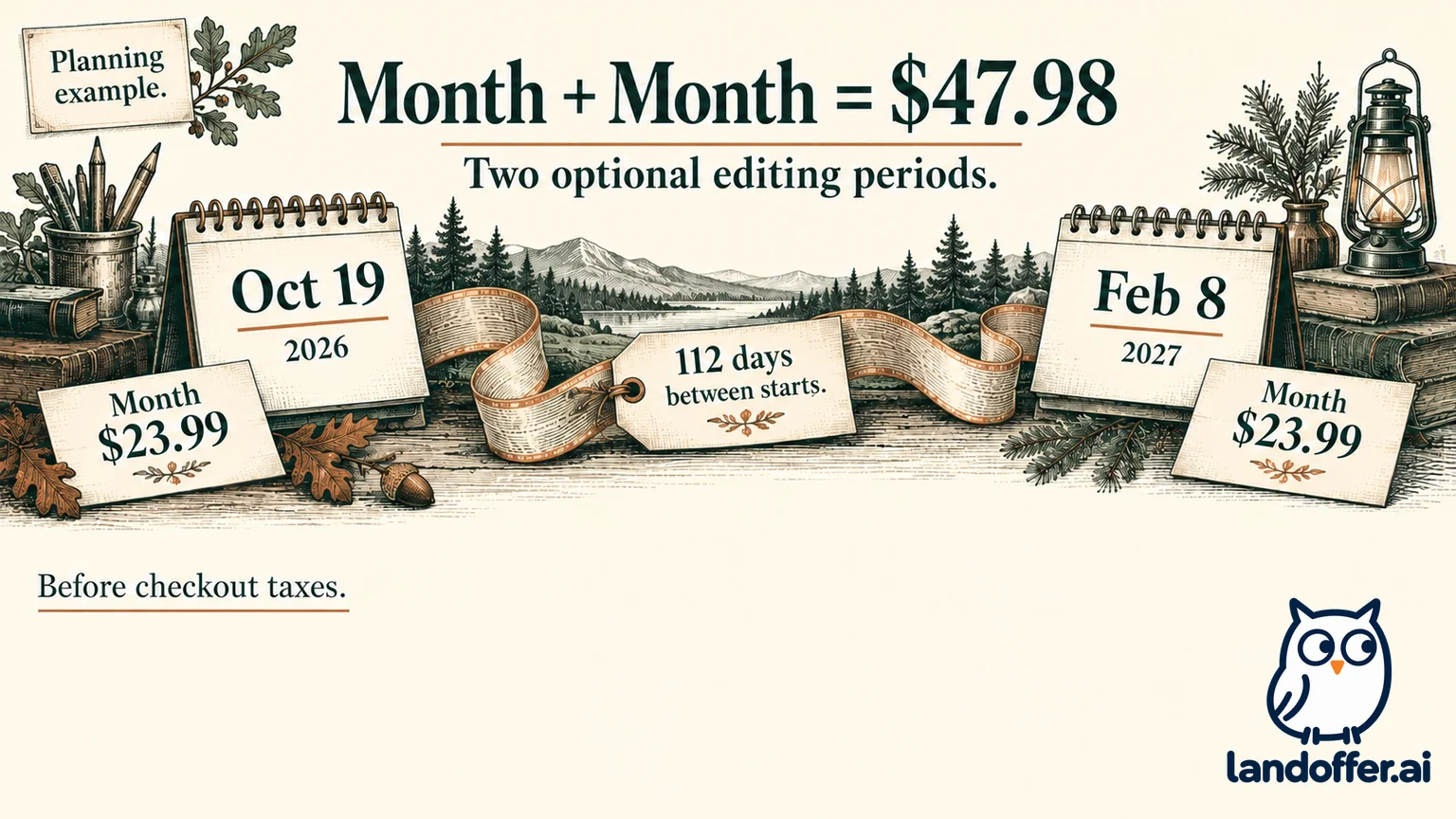
Casimir is a fictional applicant planning seven days of document editing on October 19–25, 2026, and another seven days on February 8–14, 2027. The starts are 112 days apart. We calculated those dates locally; they are his proposed schedule, not observed product access or completed future work.
His requirement is occasional paid editing, rather than keeping Premium continuously throughout the gap. Using the currently displayed base rates for every hypothetical purchase produces this comparison:
| Planned purchase combination | Total before checkout taxes |
|---|---|
| Two separate Month purchases | $47.98 |
| One Quarter plus one Month | $73.98 |
| Two separate Quarter purchases | $99.98 |
| One Year purchase | $199.99 |
A single Quarter is not treated as covering both windows 112 days apart. Paying for two months separately is a different scenario from buying a continuous two-month period. Each purchase would need its own current offer and access dates checked when the corresponding task begins.
His completed decision is to evaluate Month for the first editing window, if a paid capability is necessary. He would reassess the February 8 editing window rather than buy Year in October solely for a possible later revision. At today's assumed rates, Year costs $152.01 more than two separate Month purchases. That arithmetic does not guarantee a later price or commit him to the second purchase.
The calculation leaves taxes, actual checkout totals and precise expiry timestamps unresolved. It also does not assume the gap supplies free downloads. His existing source and reviewed attachments remain separate from the account access needed for a later revision.
If his work changes to frequent revisions, several active versions or ongoing custom-layout use, the original schedule should change too. A longer paid period may then become useful. The decision follows the editing workload rather than a promise that the shortest period always wins.
Check current version limits and refund scope
The Editor 2.0 announcement describes 144 Premium documents and a page allowance increased to 25. The pricing page still lists a maximum of ten pages. We cannot confirm an account's effective cap from those conflicting descriptions. Neither allowance is a recommendation to send a long resume.
The duplicate-document guide describes creating copies from My Documents. That supports a documented tailoring workflow, not an inference that Basic includes several active copies. Keep the plan boundary attached to the feature when comparing versions.
Refund wording also needs context. Current membership help limits its fourteen-day guarantee to the first upgrade and says deleting the account does not automatically trigger a refund. The terms, last modified June 3, 2022, describe a broader consumer cancellation request within fourteen days of purchase. Preserve that difference before relying on a refund for a later purchase.
We did not submit a refund or establish how those policies apply to an individual transaction. A purchase record and the applicable current offer are more useful than assuming account deletion, access expiry and a refund request are the same event.
Choose the document and the next revision together
Novoresume belongs on the shortlist when a PDF and its predefined or paid custom layout meet the task. Its explicit non-renewing offer can suit finite editing periods. The unresolved Basic-access description prevents a blanket recommendation for indefinite free downloads, and required Word output calls for a different verified route.
Keep your current editor when it already produces the requested attachment and supports the next revision. If you try Novoresume, first complete one representative document, identify every selected Premium feature and establish the actual download access. Open the saved file before moving the rest of your material.
Choose one recent LandOffer role and read its attachment instructions. Identify the specific Novoresume control you need, then check the account’s current download access before choosing a paid period. Inspect the resulting PDF and record how you will make its next revision before purchasing a longer access period.