LandOffer
Job search
LinkedIn InMail vs. Connection Requests: Choose an Outreach Route for Your Job Search
Choose the route that fits the relationship and request, then verify the limits shown in your account.
Choose a LinkedIn connection request when you have a real reason to join someone's network. Choose InMail when you need to make a specific, relevant request to a person outside your connections and the account provides that route. Before spending a credit, check whether you are already connected or the recipient offers a free Open Profile message. Paying for a message does not establish that the person will read it, answer, or help with your application.
LandOffer publishes this comparison. We checked LinkedIn's current public help and browser-rendered guidance on October 14, 2026. Opening My Premium led to sign-in, so we did not verify a personal credit balance, invitation allowance, or recipient composer. No invitation or message was sent. Browse recent roles on LandOffer.ai to identify the role behind your outreach; the message examples below use fictional people and circumstances.

Start with your relationship and your request
A connection request asks the recipient to add you to their network. Its optional note explains who you are and why that connection makes sense. InMail is a paid-plan messaging route for someone you are not connected to. It can carry a specific question without first asking them to establish a connection. LinkedIn's comparison.
Decide whether you want the person to join your network, clarify one role detail, or introduce you to someone else. A former colleague who knows your work is a natural connection. A recruiting contact for a named opening may instead need a concise role question. Asking a stranger to connect solely to create a channel for an immediate referral request can leave the purpose unclear.
| Your situation | Route to inspect first | Reason |
|---|---|---|
| Already a first-degree connection | Ordinary message | A paid outside-network route is unnecessary |
| Someone you know and want in your network | Connection request with relevant context | The requested relationship is the main purpose |
| Outside-network contact with one role question | Available free message, then InMail if appropriate | The immediate request is specific |
| No relevant person or clear question identified | Research the role and contact first | A messaging route cannot supply relevance |
LinkedIn's messaging help says first-degree connections can be messaged for free. It also describes possible message requests through shared groups or current-coworker context. Availability depends on the relationship and recipient settings; those are options to inspect, not universal free access to every member.
If your connection request is accepted, an ordinary message becomes the natural follow-through. The acceptance is permission to be connected, not proof that the person wants to review your résumé or arrange an introduction. Keep the next request modest and connected to the reason you gave.
Open Profile can change the paid-versus-free choice
LinkedIn's Open Profile guide says a Premium recipient who enables the feature can be contacted for free by someone outside their network. The recipient's enabled setting matters; a Premium badge by itself is not evidence that the specific free route is available.
Check the actual Message action and any composer explanation before choosing InMail. A button's label alone may not identify whether the message consumes a credit. If the screen presents a credit balance or a paid-plan prompt, read that information rather than assuming you are using an ordinary message.
We did not open a real recipient composer in this review, and we cannot report how your account displays those choices. The practical check is bounded: identify the member, confirm the relationship shown, inspect the route and credit notice, then decide whether the request fits. Do not send a test message simply to discover which payment unit was used.
An available free channel also does not make repeated contact useful. Use the same standard for Open Profile as for InMail: a reason this person is relevant, enough context to understand the question, and an easy way to answer or decline. Use the available route for a relevant request you can explain.
Invitation notes have their own limits
The current personalized-invitation page states three personalized connection notes per month and a 200-character message limit. It says Premium removes the monthly note allowance, while connection-request limits may still apply. The invitation note allowance and your InMail credit balance are separate limits.
Other live official pages differ. The invitation-limit page still says five free personalized messages, while the older comparison page describes a 300-character Premium note. The newer personalization page gives 200 characters without that distinction. We observed these differences directly in the public help, rather than treating a third-party quota estimate as authoritative.
Follow the allowance and character counter actually shown in your account. This review does not settle which free note quota a particular account enforces. The examples use fewer than 200 characters so they do not depend on a 300-character field. If your available allowance is exhausted, consider whether to wait or use another appropriate route; sending a generic invitation does not repair an unclear purpose.
The note cap is also different from the restriction on sending invitations. LinkedIn says Basic and Premium members are subject to invitation limits and a restriction typically lasts a week. It does not publish a universal weekly number on the inspected page. Buying Premium, withdrawing pending invitations, or looking for an invitation purchase should not be presented as ways to remove the restriction.
Worked relationship example: Mira reconnects after a meetup
Mira is a fictional backend developer who met Sam during a community discussion about queue retries. She wants to stay in touch before making any job-related request. Her connection note is:
Hi Sam, we met at Tuesday's backend meetup and discussed queue retries. I'd like to stay connected and follow your engineering work. —Mira
The note establishes a real shared context within the fictional scenario and states why connecting is useful. It does not claim a friendship, mention a job they never discussed, or ask for a referral before Sam has had a chance to recognize her. Our local character check confirms this note fits 200 characters; no live invitation composer or send was tested.
Suppose Sam accepts. Mira's follow-up could be:
Thanks for connecting, Sam. I found the platform engineer opening on your company's careers page. My recent work covers queue workers and retry behavior. If you know the team, is the role mainly service development or infrastructure operations? No worries if it is outside your area.
This is a complete next message, not just an instruction to “personalize.” It names the opening, provides relevant background, and asks one answerable scope question. It does not ask Sam to assess an entire career history. The example assumes Mira's stated work and the posting are real in her situation; readers should replace them with facts they can support.
If Sam replies to the invitation note without accepting the connection, Mira should continue in the available conversation rather than infer acceptance. LinkedIn's personalization guide explicitly says a recipient can respond to the note without accepting the invitation. A reply and a network connection are different states.
If Sam does not respond, Mira has a pending request, not a completed introduction. She can keep researching and applying through the employer's official route. Repeatedly asking whether he saw the invitation would add little information and would not establish role fit.
Worked direct-request example: Theo has a role question
Theo is a fictional engineer considering an outside-network recruiting contact for a named role. They have no prior relationship. After confirming the person's employer and relevance to the opening, Theo checks for an available free message. If none is offered and InMail is available, the specific request can stand on its own:
Subject: Platform role: runtime or infrastructure focus?
Hi Dana, I saw the Platform Engineer opening for the Runtime team on your careers page. I have four years of backend experience, including service reliability and deployment tooling. Could you clarify whether the role mainly owns application runtime services or cluster infrastructure? I want to assess the fit before applying. If another contact handles it, a pointer would help. Thank you, Theo.
The subject and body are comfortably below the documented InMail limits of 200 subject characters and 2,000 body characters. Keep Theo’s question short enough for Dana to understand the role distinction without reviewing his whole work history. Theo gives enough background for the question without attaching a résumé or asking Dana to book a call immediately.
The connection-note version would have a different purpose:
Hi Dana, I'm exploring your Runtime team's platform opening. My background is backend reliability. Would you be open to connecting? —Theo
This shorter text asks for a network connection but leaves the role question for a later exchange. Theo should choose it only if establishing that relationship is the actual request. It is not a shorter substitute for every InMail merely because it avoids a credit.
Neither example demonstrates that Dana is the right recipient in a real search. Confirm the named role and person before borrowing the copy. If the employer asks applicants to use its careers portal, outreach remains a question or introduction alongside that process. It does not replace a required application.
A returned credit is not a positive hiring signal
InMail balances depend on the subscription and account. LinkedIn's FAQ lists five monthly credits for Premium Career and fifteen for Premium Business. The renewal page lists accumulation limits of fifteen and forty-five respectively. This article does not quote a subscription price or infer a cost per reply; regional offers and the rest of a plan's features would matter to a purchase.
The credit-renewal guide says an InMail accepted, declined, or directly answered within 90 days is credited back. Quick Replies count as responses, while a pending message does not. It also says another InMail cannot be sent to that member until they respond. A returned credit can therefore follow a decline, not just a useful conversation.
Consider a fictional account with five available credits and no renewals or expirations during this example. Two appropriate InMails reduce the balance to three. One recipient declines within the stated window and that credit is returned, bringing the balance to four. The second message remains pending, so it produces no additional returned credit. The account has four credits, one decline, and one unresolved request.
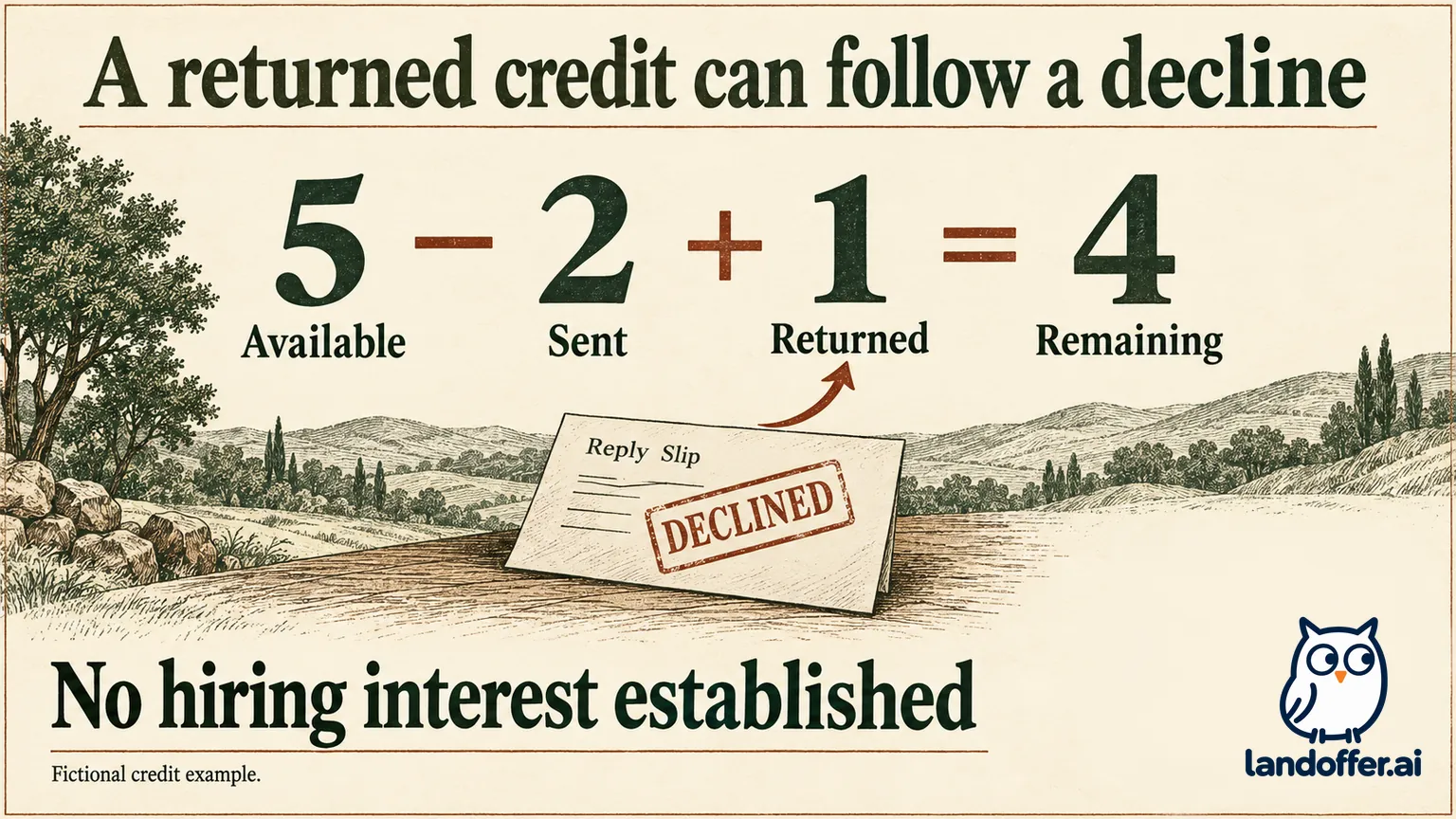
That is the full result. It does not establish a response rate, recruiter interest, an interview, or a successful application. Do not count both the original available credit and its returned replacement as two simultaneous units. Track sent, pending, answered or declined, and credit returned separately if you use a small outreach ledger.
Unused credits also have an expiry boundary. The FAQ states 90 days, and the renewal guide says the balance becomes zero when Premium is canceled and does not transfer across subscription products. Do not buy a plan on the assumption that unused credits remain indefinitely after cancellation. Read the actual account's renewal date and available balance before planning contact volume.
Decide what evidence would make the next message useful
Choose the route after you can state the purpose of the contact. Confirm the role is current, identify why the person is relevant, and write the single question or relationship request. If those details are missing, more message space will mostly create a longer vague introduction.
For an existing connection, use the context they actually know. For someone you met briefly, give enough detail to recognize the interaction. For a cold role question, avoid invented familiarity or claims that you have already researched a team when you have not. A precise, truthful request is easier to evaluate than a broad demand for “any opportunities.”
Keep confidential information out of an initial message. A résumé or project link may be useful later, but it should support the requested conversation and be appropriate to share. Do not disclose internal incidents, customer data, or another employer's private material to prove that you can do the work.
After contact, distinguish the result from the route. A connection acceptance establishes network status. A reply may answer the role question. An introduction needs the person's actual agreement. None of those states establishes an application decision. Record the concrete response and use it to decide your next step.
Use an ordinary message for existing connections, a contextual invitation for a relationship you want to establish, and an available direct-message route for a specific outside-network request. Before sending, read the composer’s route and credit notice, verify the recipient, and replace the example’s role and experience with your own facts. Explore LandOffer.ai to keep the role and its application requirements in view while choosing whom to contact.