LandOffer
Job search
Legal Name, Preferred Name, and Previous Names on Job Applications
Read name fields by their purpose, keep preferred communication separate from identification, and connect older records without unnecessary disclosure.
Use each name field for the purpose it states: legal name for legal identification, preferred or chosen name for everyday communication, and previous names when the specified verification process requests them. A single generic name field is less clear. Read the instructions and ask recruiting how the name will be used if the distinction affects your privacy or record matching. Do not assume every application field is an identity-verification form.
Choose a relevant opening from recent roles on LandOffer.ai, then inspect the employer's actual name fields before reusing a saved profile. LandOffer publishes this guide. Official references were checked October 12, 2026; Evelyn and the completed records below are fictional. This guide concerns accurate field mapping, not a universal legal rule for names, background checks or every hiring system.

Separate the three purposes before typing
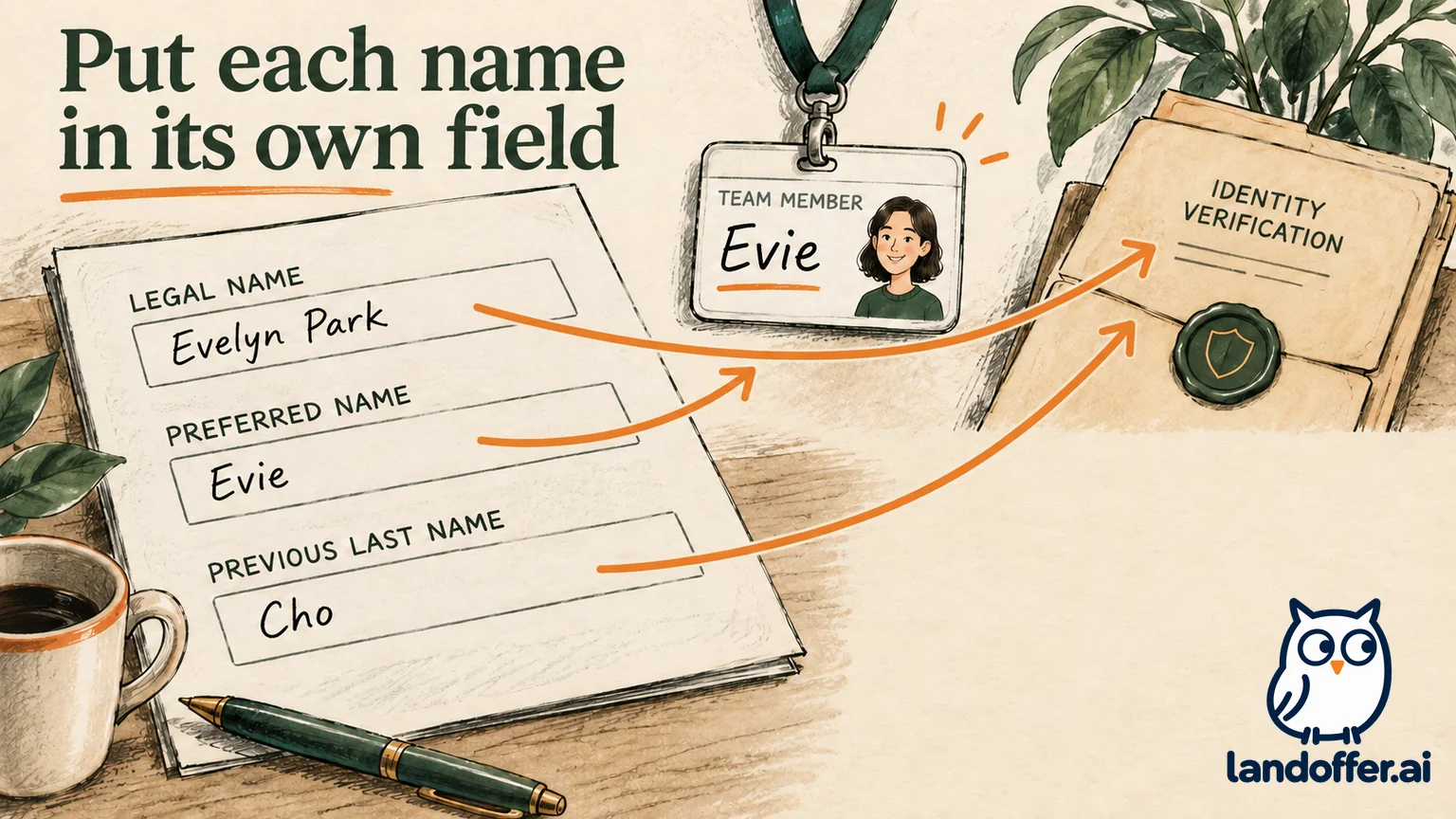
A legal name field identifies you for a stated administrative or legal process. A preferred or chosen name field records the name you want used in everyday communication. A previous-name field can help connect records created under another name. Those purposes may coexist without requiring the same text in every box.
Read the whole label. “Other last names used” is narrower than “all previous names,” and “name on your portfolio” is a different question again. Do not expand the request because you have a longer private history available.
Your everyday name may differ from the name currently recorded on identity or payroll documents. Conversely, a legal name does not establish the name you want used in an interview invitation. Recording both facts in the appropriate fields helps the recruiter address you correctly while keeping identification records understandable.
Before filling the form, identify which of these purposes it actually serves. If the prompt asks for a preferred name and your everyday name is the same as your legal first name, follow any instruction about whether to repeat it or leave the optional field blank.
A completed mapping for one candidate
Consider Evelyn Park, a fictional candidate who uses Evie in everyday conversation. Her current legal name is Evelyn Park. A former employment record and degree were issued under Evelyn Cho. The example stipulates that Cho is a previous legal surname; it does not infer why the name changed.
Evelyn prepares this private mapping before completing an application with explicitly labeled fields:
| Field or use | Completed value | Why it belongs there |
|---|---|---|
| Current legal first name | Evelyn | Current legal identification in the fictional record |
| Current legal last name | Park | Current legal identification in the fictional record |
| Preferred first name | Evie | Name to use in conversation and interview communication |
| Previous last names, if requested for verification | Cho | Connects the specified older records to the same candidate |
| Email signature | Evie Park | Chosen professional presentation for ordinary correspondence |
| Private record note | Degree and former employer records use Evelyn Cho | Explains a potential verification mismatch without exposing documents publicly |
This mapping gives Evelyn a clear answer to each question. It does not require her to put “Evelyn/Evie/Cho/Park” into a single first-name field. Combining everything there can make the intended current name less clear.
The previous surname is not a second applicant. Evelyn should not create another account under it merely to match a diploma. She can provide the connection through the verification process when it is requested.
If a field asks for full previous names rather than surnames only, Evelyn would follow that scope and provide Evelyn Cho. The wording of the field determines the entry; a table in a blog does not override the actual instructions.
When there is only one name field
A generic “Name” field does not tell you whether it feeds interview communication, account identification or later records. Check whether the instructions distinguish interview display, account name and later onboarding identification. A field's appearance does not reveal which systems receive the value; ask when that handling matters to your decision.
If there is no guidance, using your current legal name is a conservative record-matching approach, while communicating your preferred name in an appropriate note or correspondence. This is an editorial recommendation, not a requirement that every early-stage application use a legal name.
A candidate who needs a different approach for safety or privacy should ask which name is required at this stage and who will see it. The employer may have a process for keeping a chosen display name separate from restricted legal information. Confirm that process rather than assuming a preferred-name field guarantees privacy.
Evelyn's inquiry could read:
I use Evie Park professionally, and my current legal name is Evelyn Park. Your application has one name field. Should I use my legal name there, and is there a separate way to record the name used for interview communication?
That message contains only the distinction needed for the question. Evelyn does not need to attach a diploma or explain the personal reason for the older surname to resolve a generic display-name issue.
If adding both names in a note, keep the structured first and last fields clean. A parenthetical phrase that works in an email signature may be parsed awkwardly as part of a surname. Inspect the review page to see what the form actually retained.
Handle previous names within the requested scope
A verification process may ask about prior names because older employment or education records use them. Read whether the request concerns legal names, surnames, professional aliases or all names used during a specified period. If unclear, ask the verification provider or recruiting contact which category is needed.
Do not assume a childhood nickname must be added to a field asking only for previous legal surnames. Equally, do not omit a name that falls within an explicit request merely because it differs from your current professional identity. Match the scope accurately.
Keep the connection factual: “My degree was issued under Evelyn Cho.” That tells the recipient what needs to be matched. A narrative about marriage, family or identity may disclose more than is necessary to establish the record link.
If no previous-name question appears in an initial application, do not insert a complete alias history into a motivation answer. Prepare the information privately for a later authorized process. Providing relevant information at the appropriate stage makes the purpose clearer.
If a requested prior name raises a safety concern, ask about access, retention and the available process before supplying it. This guide cannot promise that an employer will restrict visibility in a particular way. Obtain an explicit explanation of the process you will actually use.
Keep onboarding identity checks separate from the initial application
Employment eligibility verification has its own instructions. The official USCIS Form I-9 instructions direct employees to enter their current legal name and previously used last names. That specific requirement should not be generalized into a rule for every resume heading or preferred-name field.
Use the current instructions supplied for onboarding rather than an old downloaded form. If the form's labels differ from your earlier application, map the information again. An earlier preferred-name entry does not change the legal-identification instruction at this stage.
The Department of Justice's name-change guidance explains that differences between a Form I-9 name and supporting documents do not automatically require rejection. The employer must assess whether documents reasonably appear genuine and relate to the employee, and handle name changes without discrimination.
The DOJ FAQ says a name or Social Security record mismatch does not, by itself, establish that a worker lacks employment authorization. It identifies several possible causes, including name changes, errors and multiple surnames. If you face a discrepancy, use the onboarding team's process to explain the factual connection rather than altering your current legal name to imitate an outdated document.
This article does not tell you which documents to choose or how a particular employer must resolve a complex case. Follow the official process and seek appropriate assistance when the disagreement concerns eligibility verification rather than ordinary application display.
Preserve multi-part names and ask about form limitations
A name can include spaces, more than one family name, hyphens or apostrophes. Start with the actual name and the field's instructions. Do not remove part of it merely because an autofill suggestion is shorter.
If the form rejects a character or has insufficient space, record the validation message and ask for the supported way to represent the name. A technical limit does not prove that part of your name is optional. Keep the full intended spelling in your private record so a workaround does not become the new default everywhere.
A mononym also needs field-specific guidance. Do not invent a surname or a universal filler value. A particular official form may provide a convention, while another application uses a different one. Use instructions for the form you are completing.
For transliteration differences, identify the document or record each spelling belongs to. Avoid treating every variant as a new legal name or silently rewriting all older records to match the newest spelling. The receiving process should explain what identifier it needs and how to connect the records.
Before submitting, inspect the displayed name, not only the boxes where you typed it. Check order, spacing and any suffix. Some systems show a single combined name on review; that is the opportunity to catch an accidental duplication.
Review consent and protect the supporting documents
A name needed to match an older record is not a reason to upload every identity document to an early application. Verify who is collecting the information, why it is requested and whether the destination is the employer's legitimate process.
The FTC's background-check guidance explains that an employer using a background reporting company must provide required notice and obtain written permission. It also describes rights concerning adverse decisions and inaccurate reports. Those protections concern a covered reporting process; they do not prove that every application-name field initiates one.
Use the authorized upload route when documents are needed. Avoid sending full identity records through a general inquiry merely to ask which name belongs in a box. If you need to explain that a degree uses an older surname, start with the factual statement and ask what verification is required.
If a report mixes your information with someone else's, dispute the report through the reporting company's process and tell the employer about the error. Correcting the spelling in your application alone does not establish that the third-party record has been repaired.
Correct names without creating a second application
If you notice an error before submission, fix it and inspect the review page again. Check saved profiles and browser suggestions so the same typo does not return on the next form. Keep legal and preferred names as separate saved facts where your tool permits that distinction.
If you already submitted, use the employer's recruiting contact or documented correction route. State the application reference, the field and the corrected value. For a display preference, say which name you want used in correspondence. For an identity error, describe the correction precisely without distributing unnecessary documents.
Evelyn's final review checks that the legal fields say Evelyn Park, the preferred field says Evie, and any requested previous-name field uses the correct scope. Her resume and email identity remain understandable alongside those entries.
For your next opening from recent roles on LandOffer.ai, prepare the same kind of private mapping using your own facts. Read each label and answer its stated purpose. If handling is unclear, ask who will see the value and how to correct it before sharing sensitive information.
Sources and Further Reading
- USCIS: Form I-9 instructions — current legal-name and previous-last-name instructions for that specific form.
- US Department of Justice: IER frequently asked questions — name changes, mismatches and employment verification.
- FTC: employer background checks and your rights — notice, permission and report correction.