LandOffer
Job search
Job Application Tracker: What to Record Before and After You Apply
A practical manual workflow for recording job identity, application evidence, resume versions and next actions without confusing saved roles with submitted applications.
A useful job application tracker records the role you found, what you actually submitted, the evidence for its current status, and the next action you need to take. Start with those decisions. A colorful dashboard cannot tell you whether an application went through if you never saved the confirmation.
Use one row for each distinct opportunity and keep discovery separate from submission. You can begin with recent roles on LandOffer.ai, then use your tracker to decide which roles deserve attention. This guide proposes a manual recordkeeping method; it does not assume that a product automatically captures every field described below.
What a job application tracker should help you decide
Your tracker has three jobs: prevent accidental repeat applications, preserve enough context to prepare for a response, and show what needs attention next. Every field should support at least one of those jobs. A column that you never use to make a decision is optional, even if it looks impressive in a template.
Imagine opening the tracker after several days away. You should be able to identify the employer, open the original role, find the resume version you used, and explain the status without reconstructing your browser history. If the row says only “Applied,” it leaves several questions unanswered: when, through which route, with which documents, and with what confirmation?
Keep the tracker small enough to maintain during an actual search. You can add details when a role progresses. A saved opportunity needs less information than an application with an interview scheduled, and a rejected opportunity rarely needs further administrative work.
Start with four groups of fields
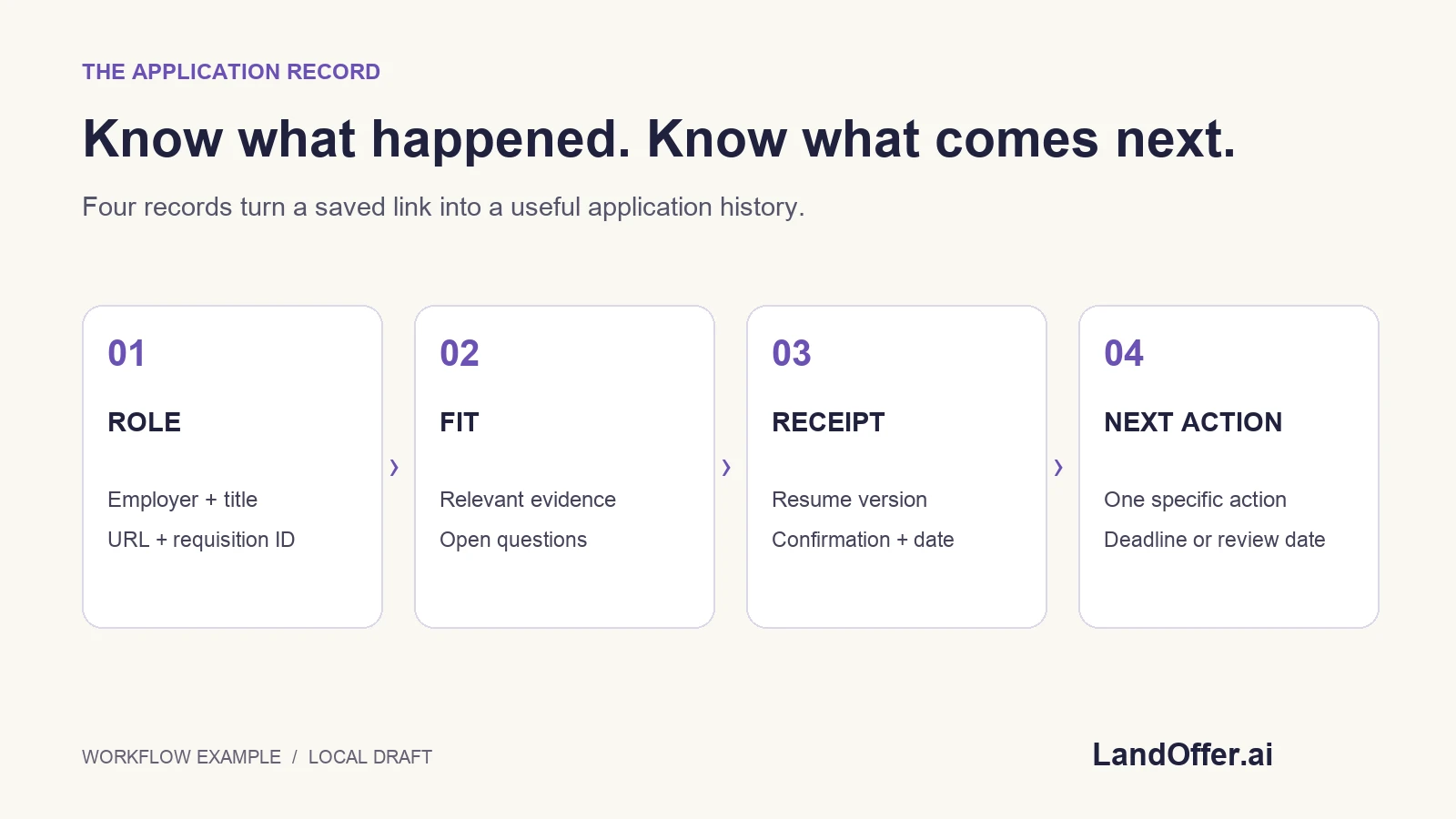
Organize fields around identity, fit, submission, and follow-up. This keeps descriptive information separate from events. The following schema is an editorial recommendation you can adapt to a spreadsheet or another tool; it is not an employer requirement.
| Field group | Record | Decision it supports |
|---|---|---|
| Role identity | Employer, exact title, employer URL, requisition ID when available, location | Is this the same opportunity I already reviewed? |
| Fit and constraints | Relevant experience, stated requirements, unresolved questions | Should I apply, investigate, or skip? |
| Submission evidence | Resume version, submitted date, confirmation reference, application route | What did I send, and did it reach a confirmed state? |
| Next action | One action, due date when known, last checked date | What should happen next, and when should I revisit it? |
Do not force every cell to contain a guess. “Not stated” is a useful value when the job description does not answer a question. It distinguishes missing information from a confirmed restriction. Likewise, a blank submission date should stay blank until you have evidence that submission occurred.
Use dates consistently. If an invitation includes a time and time zone, preserve both rather than reducing the deadline to a calendar date. Keep the original invitation accessible so you can verify the exact wording before acting.
Give each opportunity an identity you can recognize
Job titles alone are weak identifiers. Two openings can have the same title but different teams, locations, or requisition numbers. Conversely, a shared role may appear through several discovery channels. Record the employer's application URL when available and retain the requisition identifier shown on the listing.
Before adding another row, search your tracker for the employer, identifier, and title. Compare the location and application destination. If two links clearly point to the same opening, keep one opportunity row and add the second discovery route as a note. If you cannot tell whether they are the same, mark the relationship as uncertain and investigate before submitting again.
A hypothetical example makes the distinction clear. “Backend Engineer, Platform” in Austin and “Backend Engineer, Platform” in Boston might represent separate requisitions. An identical role shared on a job board and the employer's own site might represent one. The tracker should preserve the evidence you used to make that judgment rather than silently merging everything with matching titles.
Separate discovery time from the employer's posting date
Record when you first found a role in your own “Discovered on” field. If the employer displays a posting date, store that separately. Your observation date tells you when the opportunity entered your search; it does not establish when hiring began or whether anyone has already applied.
LandOffer's jobs page offers recency filters. Treat those as a way to prioritize inspection, then read the role itself. Avoid converting a relative freshness label into a claim about your chances of getting an interview. Neither a tracker nor a timestamp gives you the employer's full hiring context.
If a listing disappears and later returns, note the new observation and compare its identifier and requirements. Do not erase the old application record to make the opportunity appear new. Keeping the earlier event visible helps you decide whether to check the portal, contact an existing recruiter, or simply leave the record unchanged.
Use statuses that describe evidence, not optimism
Choose a short list of statuses with explicit meanings. “Saved” means you recorded the opportunity. “Preparing” means you are working on the application. “Submitted” means you have submission evidence. “Needs verification” means the outcome is unclear. “Interview,” “Closed,” and “Withdrawn” should reflect information you actually received or an action you completed.
In a spreadsheet, controlled choices reduce the drift between labels such as “sent,” “done,” and “applied.” Google documents how to create in-cell dropdown lists. The important design decision is to define each choice before using it, so future updates preserve its meaning.
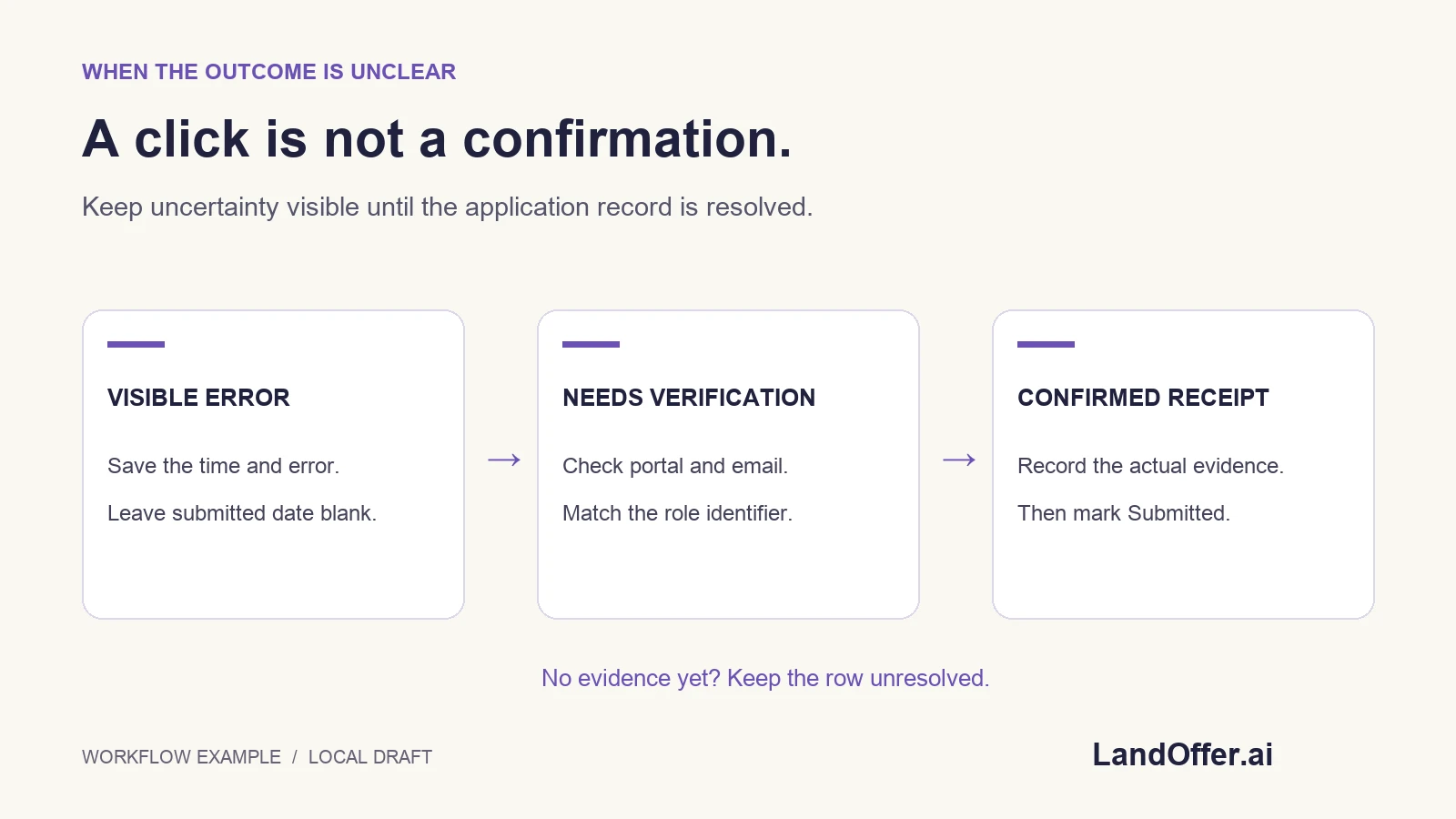
Do not promote a row to “Submitted” merely because a button was clicked. A browser timeout, interrupted upload, or ambiguous final screen belongs in “Needs verification” until you can inspect the available confirmation or portal. Save what you observed and use a next action that resolves the uncertainty. Repeating the submission immediately can make the history harder to interpret.
Keep a small application receipt
For each confirmed submission, save a compact receipt: the date, employer, role identifier, application route, resume filename or version, and confirmation reference. This can be a note linked from the row. You do not need to reproduce the entire application form to make the record useful.
Use document names that help you distinguish versions. For example, “backend-platform-resume-v3.pdf” is easier to trace than several files all named “resume.pdf.” If you change a document after applying, preserve which version went with the earlier submission. Otherwise, preparing for an interview may lead you to review a different resume from the one the employer received.
Keep sensitive files in an appropriately restricted location. The tracker can link to your own document folder instead of copying private application answers into every row. This is especially useful if you later share a limited view of the tracker with a mentor: job-search progress and the full contents of your application are different kinds of information.
Work through an uncertain submission
Consider a fictional applicant, Morgan, applying for a backend role. Morgan finds the role on Monday, reviews its requirements, and selects resume version three. The browser displays an error after the final action. Morgan sees no confirmation yet and does not know whether the employer received the application.
The tracker should preserve the uncertainty. Morgan records “Needs verification,” notes the time and visible error, and sets the next action to “Check the employer portal and confirmation email.” The submitted date remains blank. This row is now useful because it directs a specific check rather than suggesting another immediate application.
On Tuesday, Morgan finds a confirmation naming the same role. The status becomes “Submitted,” the receipt points to that confirmation, and the submitted date follows the evidence available. If the confirmation does not establish the precise time of submission, the note can say so. The tracker does not need false precision to be trustworthy.
If the portal still provides no answer, Morgan can retain the unresolved status and use an available employer contact route when appropriate. This example illustrates a recordkeeping decision, not a promise that every employer provides a portal or responds to a question.
Make the next action specific enough to complete
“Follow up” is difficult to act on because it does not say what needs checking. “Review the recruiter email and confirm the interview time zone” is concrete. “Prepare examples for the role's listed API ownership responsibilities” is concrete. Write one next action that moves the opportunity forward, then replace it after completion.
Only attach a firm due date when there is a real deadline or when you deliberately choose a personal review date. Keep those two meanings distinct. An employer's assessment deadline is a commitment from an external message; your Friday review reminder is a planning choice you can change.
Do not create a universal recruiter follow-up schedule from the tracker template. Use the instructions and communication associated with that opportunity. If an employer has given a timeline or asked candidates not to contact the team, preserve that information beside the next action.
Review a small active list instead of counting everything
During a review, focus on rows with unresolved outcomes, upcoming deadlines, and actions you can complete. A long list of saved roles can create the appearance of progress while hiding the few items that require a decision. Filtering by next action or status makes the tracker useful during a short working session.
Treat counts as descriptions of your own records. Ten submitted applications means ten rows meeting your definition of confirmed submission; it does not predict an interview rate. If you compare results over time, check that your status definitions and recordkeeping habits stayed consistent. Otherwise, a change in the chart may reflect a change in data entry.
Keep closed opportunities for context, but remove them from the active view. That lets you look up an earlier application without repeatedly considering it as unfinished work. A useful review ends with a short set of actions, not with a larger collection of decorative metrics.
Connect discovery and application tools carefully
Your tracker can sit alongside job discovery and application tools without assuming they share the same records. When you use autofill, check the completed form and note which documents you selected. When a service offers a separate automated application workflow, understand how it reports outcomes before mapping those outcomes to your tracker statuses.
LandOffer's privacy page describes different submission behavior for its extension and its opt-in AI Agent Apply service. Read the current product instructions for the workflow you choose. A manual tracking method does not verify the reliability of either workflow or replace your review of the information being used.
Start with one role and complete the four field groups. You can browse recent roles on LandOffer.ai, record the employer's destination, and decide whether the opportunity fits before spending time on an application. The tracker is doing its job when you know what happened and what to do next.