 LandOffer
Autofill · Job search
Simplify Copilot Review: Autofill, Resume Tailoring, and Application Tracking
A documentation-based review of Simplify Copilot: what stays free, when Simplify+ may help, how resume tailoring works, and three examples that clarify the application tracker.

Simplify Copilot is worth considering if repeated application forms are slowing your search. Start with its free autofill and tracker; consider Simplify+ when you need recurring help rewriting resumes and application answers. Its strongest documented advantage is carrying one profile into forms and keeping the surrounding job-search work together. That convenience has limits: supported pages vary, saved answers need context, and a tracker entry can represent a bookmark rather than a submitted application.
This review evaluates Simplify's public documentation checked on October 8, 2026. We did not test a signed-in account, measure autofill accuracy, or verify hiring outcomes. Examples below are fictional teaching cases. LandOffer publishes this review and also offers job-search tools; you can browse recent roles on LandOffer, but this article does not establish that LandOffer performs better than Simplify.
What you get free, and what Simplify+ adds
The Copilot product FAQ commits to keeping autofill, the application tracker, job matches, and the basic resume builder free. It also says autofill has no application limit. That is a substantial starting package: you can address repetitive typing and scattered records before deciding whether paid writing assistance is useful.
The distinction below follows the detailed help pages. The product page's broad language about free tailoring should not be read as a promise that every AI writing feature is free.
| Capability | Documented access | Practical buying implication |
|---|---|---|
| Application autofill | Free core feature; no stated application count limit | Repeated forms alone are not a reason to upgrade. |
| Job Tracker, job matches, basic resume builder | Free core features | Try the connected workflow before buying additional writing tools. |
| Job-specific keyword comparison | Described in Copilot and Resume Builder documentation | Reading feedback and paying for an AI rewrite are separate decisions. |
| AI resume tailoring and bullet rewriting | Simplify+ | Most relevant when you regularly adapt an existing resume to different roles. |
| AI cover letters, application answers, outreach and additional job analytics | Simplify+ | Pay for tasks you will use, rather than the length of the feature list. |
| Autopilot submission agent | Beta for a subset of Simplify+ members | A paid subscription does not guarantee current beta access. |
Sources: core free features, Simplify+ features and prices, resume tailoring, and Autopilot access.
The pricing help page lists $19.99 for one week, $39.99 for one month, and $89.99 for three months. These are listed plan totals, not interchangeable monthly prices. It says the plans contain the same Simplify+ feature suite and renew automatically unless canceled. We checked the public page, not a purchase checkout; confirm the final billing terms before subscribing.
Our recommendation is to start free when your resume is already in good shape. Consider upgrading for a recurring task you can name, such as adapting resumes for several role types. A longer subscription's lower average cost offers little value if you stop using its features after a few applications. Paying also does not remove the need to review generated material.
Copilot autofill and Autopilot are different workflows
In the documented Copilot workflow, you open the application, run autofill, review the completed fields, and submit it yourself. The panel separates resumes, cover letters, common questions, and unique questions. That division is useful because uploading an existing document is a different task from generating an answer.
Autopilot is a separate agent: you choose a job, and it completes and submits the application without a final review step. Its current beta is limited to selected Simplify+ members. This review's recommendation for applicant-reviewed filling concerns Copilot, not that agent.
There is also a documentation ambiguity worth resolving before enabling more automation. The extension settings guide says continuous multipage autofill proceeds until an application is submitted, while the Copilot/Autopilot comparison describes Copilot's final submit as manual. We have not tested that setting. If reviewing each page matters to you, leave continuous autofill off and use the documented per-page control. Do not assume every setting has identical behavior.
Where Copilot saves work—and where setup matters
Simplify's installation guide lists Chrome and Chromium browsers such as Edge and Brave, plus Firefox. It specifically labels Firefox support as beta with limitations. The same guide names application systems including Workday, Greenhouse, Lever, Ashby, iCIMS, and Taleo. These are documented targets, not a guarantee about every employer's customized form.
The reusable profile is the practical center of Copilot. Invest in accurate employment dates, education, links, and resume selection once, then inspect what reaches each application. If your work history spans three employers, avoiding repeated entry of those roles can be more useful than generating a cover letter you do not need. For someone submitting one short application, setup may offer little immediate benefit.
The settings guide lets you disable individual fields, with examples including work authorization, disability, salary, and location. Use that control when a category needs a fresh decision. It is more precise than choosing between letting everything fill and abandoning autofill altogether.
Saved unique answers need similar care. According to the autofill guide, Copilot can reuse your response when the exact question appears again. Consider a fictional answer to “Why are you interested in this company?” that names Pinebridge's developer tools. The same wording on another company's form does not make that answer appropriate there. Review the company-specific substance even when the question matches perfectly.
When direct filling is unavailable, the unsupported-page guide describes a copy-and-paste view in Copilot's Profile tab and a way to request support. That fallback preserves access to your details but leaves the form work with you. If most target employers require this fallback, Copilot's main benefit for your search becomes smaller.
Resume tailoring: use the missing terms to investigate a gap
Simplify documents two different signals. Its Keywords Score compares the chosen resume with one job description; its Simplify Resume Score appears in Resume Builder as a broader resume assessment. Neither is a score supplied by the employer reviewing your application. The keyword guide suggests roughly 70% coverage as guidance, while saying the number should not block an application. Treat that as Simplify's recommendation, not an employer cutoff.
Simplify+ can rewrite bullets and generate a job-specific version. The tailoring guide says the original remains unchanged and the tailored version is saved separately. You can therefore emphasize backend service work for one application and data analysis for another, while retaining the same base resume.
Here is a fictional editing example, not output produced by Simplify. A candidate's original bullet says:
Built tools to process customer data.
The target job mentions Python, validation, and PostgreSQL. The candidate's project notes confirm Python validation of incoming CSV files, rejected-row logging, and loading accepted rows into PostgreSQL. A defensible revision is:
Built a Python CSV validation tool that logged rejected rows and loaded accepted customer records into PostgreSQL.
The revised bullet makes existing evidence visible. It adds no invented throughput, leadership claim, or business result. If the posting also asks for Kafka and the candidate never used it, that missing term should remain missing. A keyword gap can reveal a real experience gap, rather than a wording problem that software should erase.
This is where paid tailoring can help: preparing a first rewrite from relevant material. Its value declines when the source profile is vague or when every suggestion needs substantial correction. Before attaching a tailored file, compare its claims with your project records and open the exported document. Keep the submitted version so an interview invitation does not leave you guessing which resume the employer received.
Three tracker situations with different correct records
Simplify's tracker guide distinguishes saved jobs, applications originating from its job board or matches, and jobs handled through Copilot. It describes automatic capture but also mentions an add-to-tracker prompt after a Copilot submission. Its custom-application guide provides a manual route when needed. These descriptions do not establish that every outside application appears without attention.
The following fictional cases turn those rules into a usable record. Company names, job IDs, and filenames are invented; they are not actual account observations. “Next action” is our planning note, not a claim about a required Simplify field.
1. A bookmarked role that has not been submitted
Maya saves Pinebridge Labs' Product Engineer role, PB-104, from Simplify's job board. She has not opened the employer's application. The bookmarking instructions place saved opportunities in the tracker's Saved area.
Her record should therefore represent Saved, with no claimed submission date or receipt. Her next action is to read the onsite requirement before preparing a resume. This is a useful tracker entry: it preserves an opportunity she intends to evaluate. Counting it as an application would make her search history less accurate.
2. An application submitted with Copilot
Maya then applies to Northline Tools' Backend Engineer role, NT-218, using Copilot on a supported form. In this example, she checks the fields, attaches maya-backend-v2.pdf, presses the employer's submit button, and receives a confirmation email.
She checks the tracker for that requisition and follows any add prompt before creating a manual duplicate. Her intended record is Applied, associated with NT-218 and the submitted resume; she keeps the confirmation and filename in her own notes if needed. If the job was captured but its status differs, she reconciles the record with the employer confirmation. The receipt establishes what happened; the tracker organizes it.
3. A role applied to outside Simplify
Finally, Maya submits an application directly to Orchard Research for OR-17 and receives confirmation. Copilot cannot process that page, and the role is absent from her tracker. Following the custom-application guide, she uses + Add Application, enters the company and role details, and saves the record.
She then checks that the record reflects her completed application rather than a bookmark, retaining OR-17 and the confirmation in her notes. The correct result is one manually maintained application record. Adding it to Simplify does not send another application to Orchard. If Maya had only discovered the role, she would keep it as a saved opportunity instead.
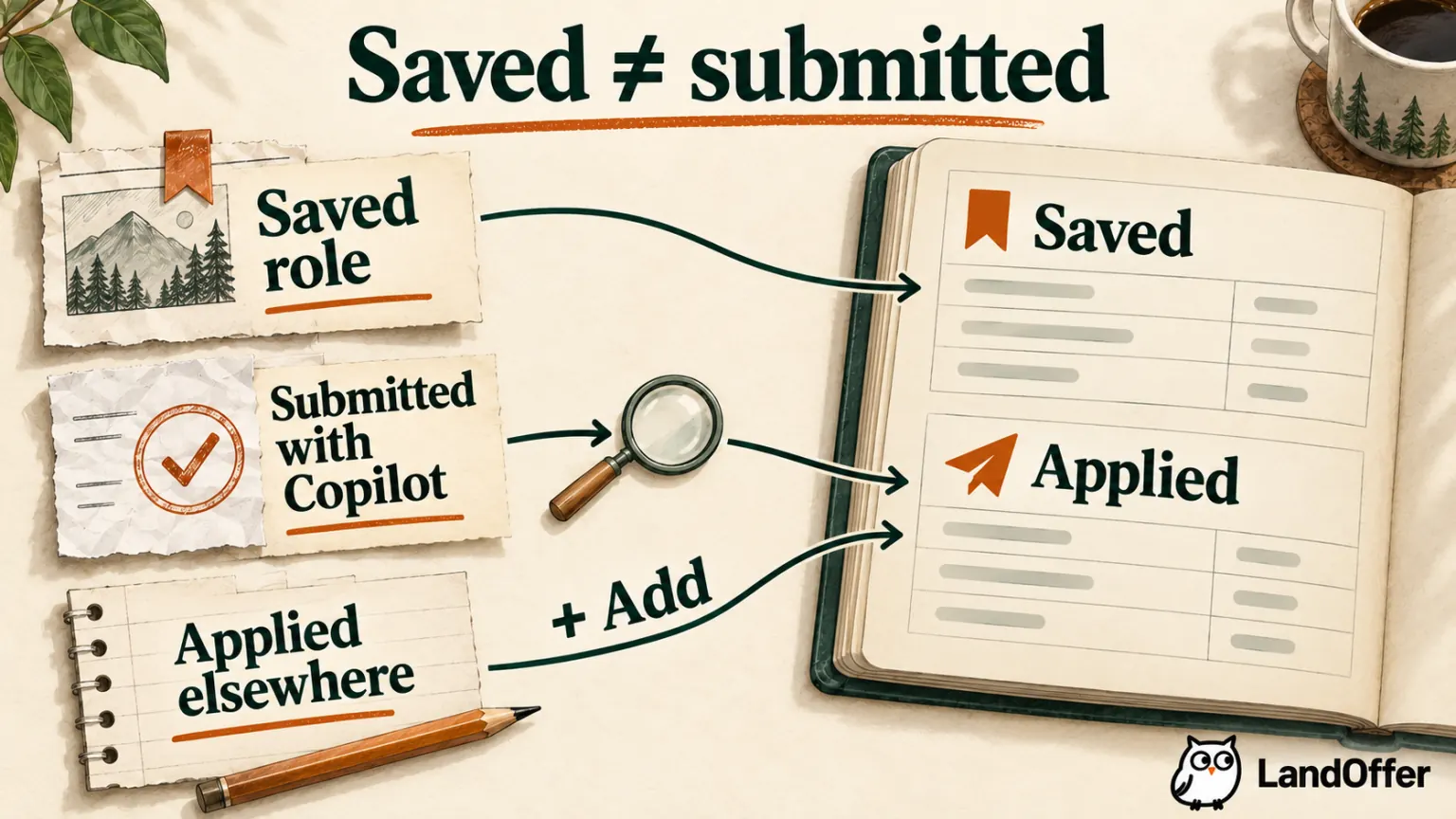
Across these cases, Maya has one saved opportunity and two submitted applications, not three applications. This distinction makes the tracker useful for follow-up: she can see which role needs research and which employers have received materials. It also explains why automatic capture is a convenience rather than a complete recordkeeping guarantee.
Who should use Copilot, keep it, or look elsewhere?
Start with free Copilot if you repeatedly enter the same history on supported employer forms. Its combination of reusable profile data and application organization is a credible reason to try it. Keep it if form filling and records already meet your needs; moving a working routine to another tool adds setup and migration work.
Consider Simplify+ if you regularly need role-specific resume and application writing help, and reviewing its drafts is easier than composing from scratch. Look elsewhere or combine tools if unsupported forms dominate your search, your discovery feed is the main problem, or a spreadsheet already gives you the tracking detail you need. Our Simplify alternatives guide covers those replacement needs separately.
Data sharing is part of this choice. Simplify's privacy policy, updated August 19, 2026, describes processing job pages, application fields, and profile material for extension features. It treats voluntary self-identification and optional integrations separately. Read those sections before adding information you would not want handled by another service; this review is not a privacy or security audit.
For your next application, choose a role worth pursuing, decide whether your bottleneck is filling or writing, and use the free/paid distinction above. If you need a starting shortlist, browse recent roles on LandOffer, then open the employer's posting to check the requirements and application route. Choose an application tool after you know what that role requires.
Sources and Further Reading
- Simplify Copilot product FAQ — core free features.
- Simplify+ features and pricing — paid tools, plan totals, and renewal.
- Installing Copilot and using autofill — setup and standard flow.
- Autofill settings and unsupported pages — controls and fallback.
- Resume tailoring and Keywords Score — versions and scoring.
- Job Tracker, bookmarks, and custom applications — entry routes.
- Getting started with Autopilot — separate submission agent and beta access.
- Simplify privacy policy — data categories and choices.