LandOffer
Job search
Resume Matcher Review: Local Models, Change Approval, and Resume Exports
Review Resume Matcher’s local and cloud model choices, whole-preview approval, batch queue behavior and PDF exports, with completed configuration and editing examples.
Resume Matcher is a strong option for technically comfortable job seekers who want to choose their AI model, inspect resume changes and produce PDFs. You maintain the installation, check where the model receives your data and verify the wording. On the single-job Tailor page, you confirm or reject the entire preview; the batch queue saves results without that review step. Word import does not mean Word export.
This review examines official documentation and public source code checked on October 13, 2026; we did not install the application, benchmark models or test its exported files against an employer's system. LandOffer publishes this review. You can use recent roles on LandOffer.ai to find a description to evaluate, then decide whether Resume Matcher's editing workflow fits your needs. The examples below are fictional.
Who Resume Matcher is built for
The project describes itself as a free, open-source application you run yourself. You connect a model, provide your resume and a job description, then work on a tailored document. Its official overview positions it for people willing to manage a local installation. That requirement should drive your decision before template appearance or an appealing match score.
It suits a developer who already understands a local model server or API configuration and wants to keep an editable master alongside job-specific versions. It is a weaker fit if an application is due soon and you have never maintained a local app. Installation and troubleshooting consume the same time you could spend checking whether your experience addresses the posting.
This is also a narrower choice than an end-to-end job-search service. A resume editor can help express relevant experience; it cannot supply missing qualifications or establish that an application reached an employer. Keep those decisions outside the tool's writing feedback.
Local installation and local inference are separate choices
Running the interface on your computer does not determine where the AI processes your resume. The provider guide supports cloud providers and local servers. With a cloud API, resume text and job information are sent to that provider. The guide says contact details are included and no automatic redaction happens first.
With a model running on the same computer, inference can remain on that computer. Inspect the configured endpoint. An app connected to a remote server has a different data path, even if the software or model is open source. This review did not independently inspect network traffic, provider retention settings or anyone's installation.
Consider two fictional candidates who have already chosen their setup. Their decisions illustrate the documented architecture, not measured model quality.
| Decision | Morgan: keeps inference on the computer | Taylor: accepts cloud processing |
|---|---|---|
| Constraint | Resume text should stay on Morgan's machine | Avoid running a model locally for this application |
| Selected route | Resume Matcher with a same-computer Ollama model | Resume Matcher with a chosen cloud API provider |
| Data destination | Local model endpoint | Provider receives resume and job content |
| Cost responsibility | Hardware, electricity and maintenance time | Provider usage charges plus local app maintenance |
| Completed decision | Retain local inference; edit manually if generation is unsuitable | Accept the provider's processing terms and monitor its usage dashboard |
Morgan does not solve a slow model by silently switching to cloud processing: that would change the requirement the setup was chosen to satisfy. Taylor can reasonably make the opposite tradeoff. Neither choice establishes whose rewrite will be more accurate. Both still need to inspect the result.
The practical question is whether you can explain the data path without using the word “local” as a shortcut. Record the provider, model and endpoint beside your setup notes so a later configuration change can be compared with the choice you approved. If the endpoint changes, revisit the decision before processing another real resume.
Free software still has an operating cost
Resume Matcher does not charge a software subscription for this open-source workflow. Cloud usage is billed by the selected provider; the app does not track that spend. Local inference avoids those per-request provider charges, while your computer and your time remain part of the cost. The provider guide gives no universal cost per finished application, and neither do we.
Budget around the work you perform: importing, tailoring, regenerating and optionally generating other material can create separate AI requests. If you keep reopening the same inaccurate draft, a small manual edit may be the calmer way to finish the application. Set a stopping rule tied to the document: stop generating once you have a truthful, readable version that addresses the role.
For a source installation, the project's setup instructions describe the backend and frontend as separate processes. Docker packages much of that setup, but a model still needs configuring. Avoid interpreting an installation shortcut as proof that the entire editing and export workflow is ready.
One concrete failure has a documented explanation. With Resume Matcher in Docker and Ollama on the host, the container's localhost refers to the container. The Docker and Ollama guide uses host.docker.internal:11434 for the host service and includes Linux configuration details. Confirm the connection before changing models or repeatedly retrying the same resume.
The provider guide says Test Connection sends a short greeting. A response confirms that connection, but does not establish that the model can complete structured tailoring. The guide also cautions that small models can struggle with the required edit format; no minimum model or speed benchmark is established here. Try a synthetic resume first, then examine whether names, dates and supported claims survive. Do that before spending an application deadline diagnosing a fresh installation.
Change approval depends on which route you use
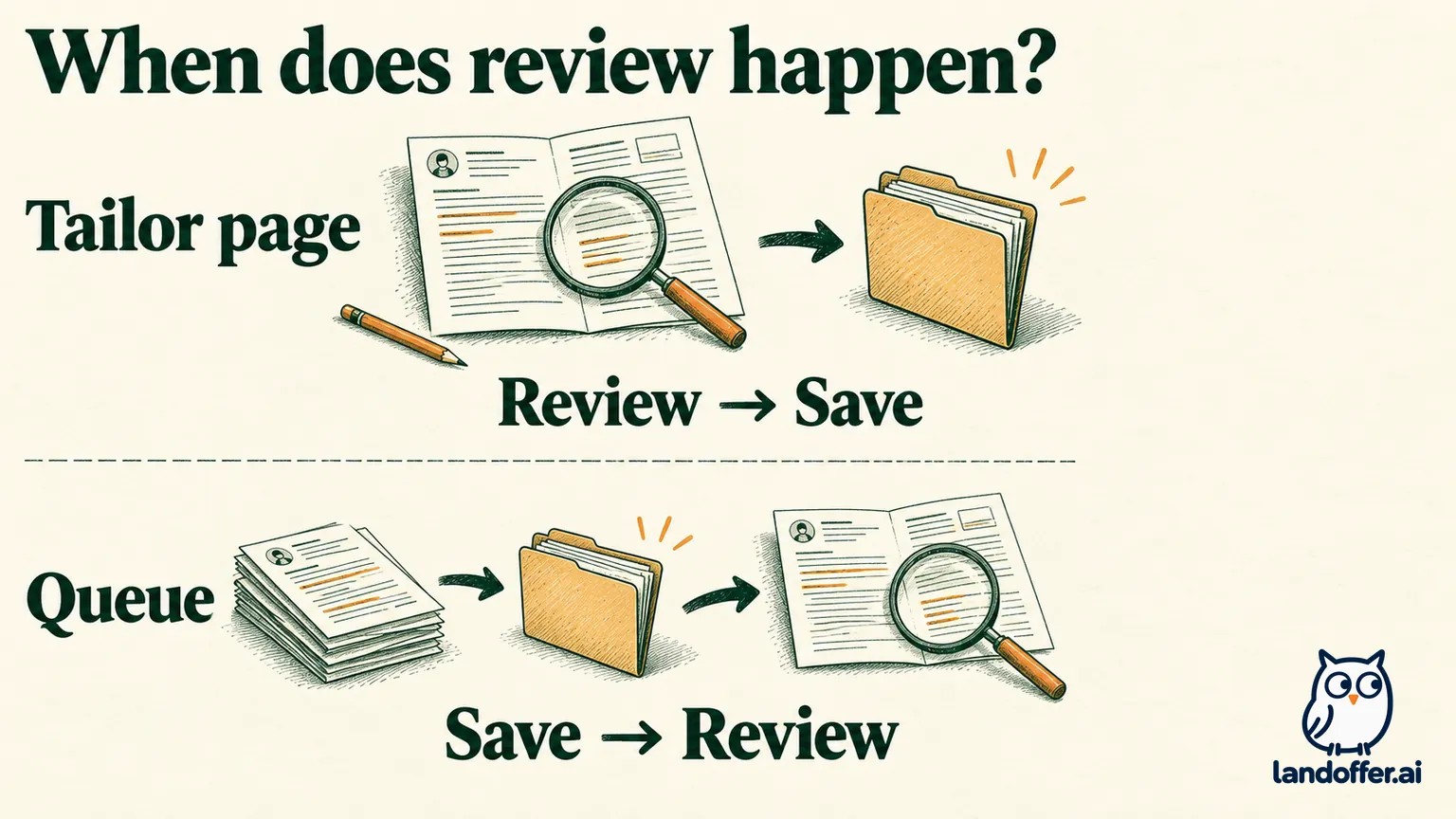
On the single-job Tailor page, the documented preview shows changes before you save the tailored version. Its Confirm & Save action accepts the whole preview; Reject & Regenerate discards it and requests another version. The inspected preview component likewise connects confirmation to the complete result. Reviewing individual changes does not imply a separate accept button for each one.
That matters when four edits are useful and one is wrong. Your review notes can record five separate judgments, but the interface's decision still applies to the preview as a whole. Reject an unsuitable draft, or deliberately save it as unfinished and correct it in the builder before export. Saving a draft should not become your definition of factual approval.
The batch route is different. The usage documentation says queued jobs skip the review step and save generated resumes directly. The inspected queue worker invokes the tailoring pipeline without the interactive preview. A queue is therefore suitable only if you can reserve time to open and review its outputs afterward.
The same documentation says generated tracker cards can enter the Applied column. That label is an internal record, not an employer receipt. Resume creation has not demonstrated submission. Correct the card if necessary and record actual submission separately after completing the employer's process.
A completed review: useful wording, unsupported scope
Morgan's fictional master resume describes maintaining a Rust batch processor that validates incoming event files and writes rejected records to a review log. Morgan has not owned a streaming platform, managed engineers or used Kubernetes. The target role asks for Rust, operational reliability and Kubernetes experience.
Suppose a proposed revision contains the following changes. These are invented teaching examples, not captured Resume Matcher output. The review deliberately includes statements that sound plausible without adding a number or changing an employer.
| Proposed change | Evidence check | Morgan's completed decision |
|---|---|---|
| Replace “worked on data tasks” with the Rust batch-processing work | Supported by the original project notes | Keep the concrete task and language |
| Describe ownership of a real-time streaming platform | Batch processing and platform ownership are different claims | Remove that wording |
| Add Kubernetes to skills because the posting requests it | No work, training or project evidence | Remove the skill |
| Replace “maintained” with “led the engineering team” | No people-management responsibility | Keep the individual contribution |
The final bullet reads: “Maintained a Rust batch processor that validated incoming event files and wrote rejected records to a review log.” It makes the relevant evidence visible without inventing architecture ownership or a result measurement. Kubernetes remains a qualification gap.
This case matters because the documented safeguards are bounded. The project checks protected information and new numbers, yet its usage guide allows some job-description skills to be proposed with a high-risk warning. Wording can also exaggerate scope without changing a protected field. A warning is a request for judgment, not evidence that the skill belongs on your resume.
Morgan's first whole-preview decision is to reject the unsuitable revision. The replacement wording above becomes the editing target. Any later saved version still receives a final factual check before export. This is a completed editorial decision, rather than a claim that a second generation would produce that exact sentence.
Resume exports: PDF output has its own acceptance check
The current feature page documents PDF output for resumes and cover letters. Word documents are accepted as input, but output is PDF only. If an employer specifically requires an editable DOCX file, that requirement is a reason to retain a Word-based workflow. Upload support is not an export-format promise.
The template guide lists seven layouts, including single-column and two-column options. A template named LaTeX does not establish a downloadable LaTeX source file. Choose a layout for the information you need to communicate, then inspect the resulting document instead of treating the template name as a quality certificate.
PDF generation also has a technical dependency. The app prints a frontend page through Chromium; the PDF implementation is separate from model inference. A successful rewrite cannot establish that the browser dependency or print page works. Keep the frontend available and follow the documented browser setup if export fails.
For Morgan, a useful fictional acceptance record would read: “Rust role PDF: correct version; contact details legible; batch-processing bullet retained; Kubernetes absent; text copies in a sensible sequence; page breaks checked.” These are illustrative acceptance findings, not an export test performed for this review. They show what completion should mean beyond the presence of a downloaded file.
Open the actual file you will attach, select and copy its text, and compare the extracted sequence with what you see. Check headings, dates, links and the boundary between pages. If something is missing, revise the saved document or formatting and export again. Keep the checked file identifiable by role and version so an older draft is not attached accidentally.
Resume Matcher's ATS Check examines its own PDF's readability; it does not run your application through every employer's system. Its matching scores answer another question again. Our ATS resume score guide explains why neither a percentage nor successful extraction establishes a hiring outcome.
The decision to use it
Choose Resume Matcher when controlling the model connection and inspecting tailored PDFs are worth maintaining the software. Start with the single-job route if you want a visible review before saving. Use the queue only when reviewing already-saved drafts is an acceptable part of your process.
Keep your existing editor when it already produces an accurate document, when DOCX delivery is mandatory or when setup would displace the work of checking your claims. There is no reason to migrate merely to obtain another score. The useful result is a relevant resume you can defend, in the format the recipient accepts.
Browse recent roles on LandOffer.ai, choose one description and compare it with your documented experience. If Resume Matcher fits your constraints, confirm the model destination and any provider charges, then use that pair for one reviewed revision before creating a batch.
Sources and Further Reading
- Resume Matcher overview: purpose and self-hosted model.
- AI provider guide: processing destinations, configuration and cost.
- Docker with Ollama: host connection details.
- Usage documentation: review, queue and safeguards.
- Feature overview: export boundaries.
- PDF templates: layout options.
- Public repository: source reviewed at commit db0e6ac; documentation and installed releases can differ.